Plugin
MS Widener
Widen the stereo image without losing mono compatibility.
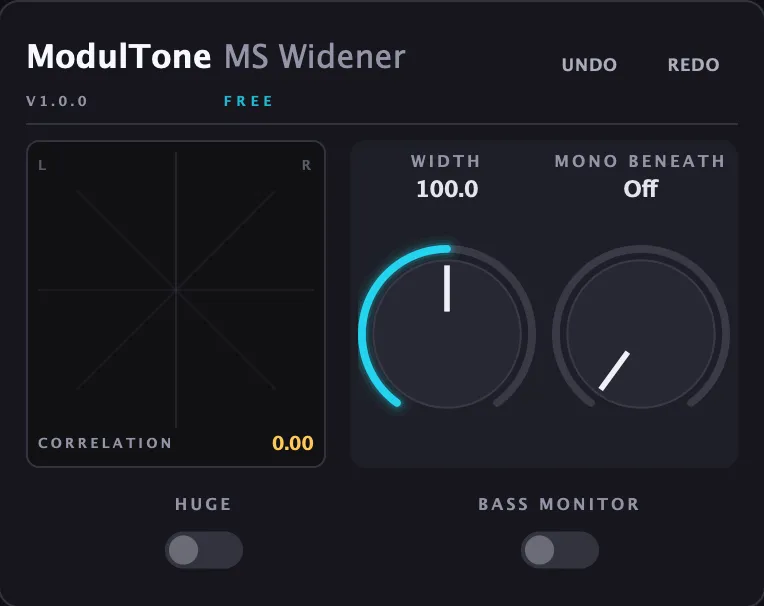
Most widener plugins are a single knob that either does nothing or falls apart the moment someone checks the mix in mono. This one splits the difference: width is applied above a bass crossover, so the low end stays centered and phase-safe while everything above it opens up. It's free because it's also the plugin that shows you what mid/side actually looks like before you commit to the paid ones — the built-in goniometer plots the stereo field in real time as you turn the knob, so width stops being something you only hear and starts being something you can see.
Hear it
Controls
Width
0 to 200%. Above 100% widens past the source material's natural stereo spread; below 100% narrows toward mono.
Mono Beneath
Sets a crossover frequency below which the signal collapses to mono, so bass stays centered no matter how wide the top end gets.
Huge
A more aggressive widening character for material that can take it — further from the source, more obviously processed.
Bass Monitor
Solos the mono-collapsed low end on its own, so you can check exactly what's happening below the crossover.
What it does
- Width control from narrow to wide, 0–200%
- Mono Beneath collapses low frequencies to mono below a set crossover, so bass stays centered
- Retro and Huge modes for two different widening characters
- Built-in goniometer shows the stereo field and channel correlation in real time
- Bass Monitor auditions the mono-collapsed low end on its own
Specs
- Formats
- VST3, AU, AAX
- Requirements
- macOS 11 or later (Apple Silicon & Intel) · Windows 10 or later (64-bit) · VST3, AU, or AAX host