MS EQ
Mid/side character EQ plugin for macOS and Windows
A low shelf, a mid bell and a high shelf, split into mid and side.
No audio demo for MS EQ.
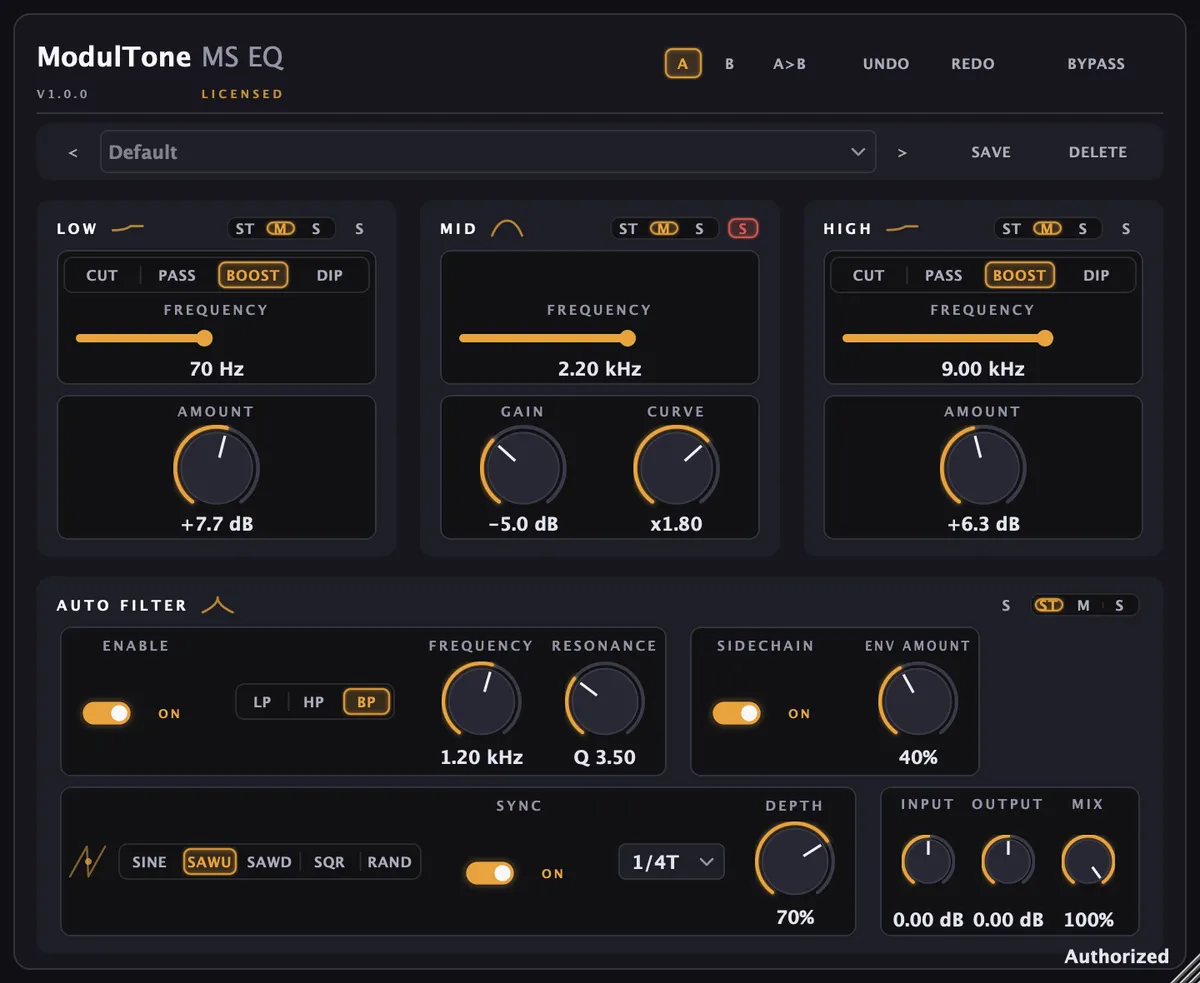
Three character bands: a low shelf, a sweepable mid bell and a high shelf, each splitting into an independent mid half and side half in Mid-Side mode, so a move on one never touches the other. The low band has its own trick: boost and cut share one frequency selector, and they don't cancel. The cut's corner sits above the boost's, so turning both up gives you a bump at 60 Hz and a dip in the low mids above it, body from one and tightness from the other at the same time. The bump comes from a resonant shelf, the way a passive network with an inductor overshoots just below its corner.
Bands
Low
Boost and cut on one selector, and they work against each other on purpose. Boost alone lifts just above the selected frequency; cut alone pulls the low mids down. Together they make the bump-and-dip curve that this kind of circuit is known for. At the very bottom the two curves nearly cancel, which is correct — piling on gain below the selector is subsonic energy and nothing else.
Mid
A bell from 150 Hz to 7.2 kHz, up to 15 dB either way. Curve multiplies the bandwidth the gain would normally imply, so a 6 dB lift can be a wide tilt or a narrow notch without touching the frequency.
High
A shelf that boosts and does not cut, at one of five fixed corners from 4 to 12 kHz. Air on the sides and none on the mid is one switch away in Mid-Side mode.
What it does
- Three character bands: a passive-style low shelf, a sweepable mid bell, a high shelf
- Stereo mode drives both channels from one control set; Mid-Side splits every band into an independent mid half and side half
- Low band: boost and cut up to 14 dB each, sharing a 20 / 30 / 60 / 100 Hz selector
- The low cut is only ever a cut. No setting turns it into a boost, and the self-test asserts that its curve never rises above 0 dB anywhere in the spectrum
- Mid band: 150 Hz to 7.2 kHz, ±15 dB, with a Curve control from 0.4x to 2.5x that widens or tightens the bell without moving its centre
- High band: boost up to 10 dB at 4, 6, 8, 10 or 12 kHz
- Automatic Filter: a switchable low-pass, high-pass or band-pass stage with its own frequency and resonance, running on the full signal or split to mid/side like the rest of the plugin
- The Automatic Filter's cutoff is pushed by an LFO (sine, up-saw, down-saw, square or random, free-running or tempo-synced, with a depth control) and a sidechain envelope follower at the same time, not either/or
- Input and output trim, ±18 dB, and a Mix control for parallel EQ
- The frequency knob is skewed toward 1 kHz, so a mid band doesn't spend half its travel above 3 kHz where it has the least to say
Specs
- Formats
- VST3, AU
- Requirements
- macOS 11 or later (Apple Silicon & Intel), VST3 or AU host · Windows 10 or later (64-bit), VST3 host
- Version
- 1.0.0 · 30 Aug 2026
How to use it
- How to use mid/side EQ
EQ in stereo moves the centre and the edges of a mix together. Splitting a band into mid and side is how you brighten the room without brightening the vocal.