MS Widener
Free stereo widener plugin for macOS and Windows
Turn up the width and the bass stays centered.
No audio demo. MS Widener is free, so try it on your own tracks.
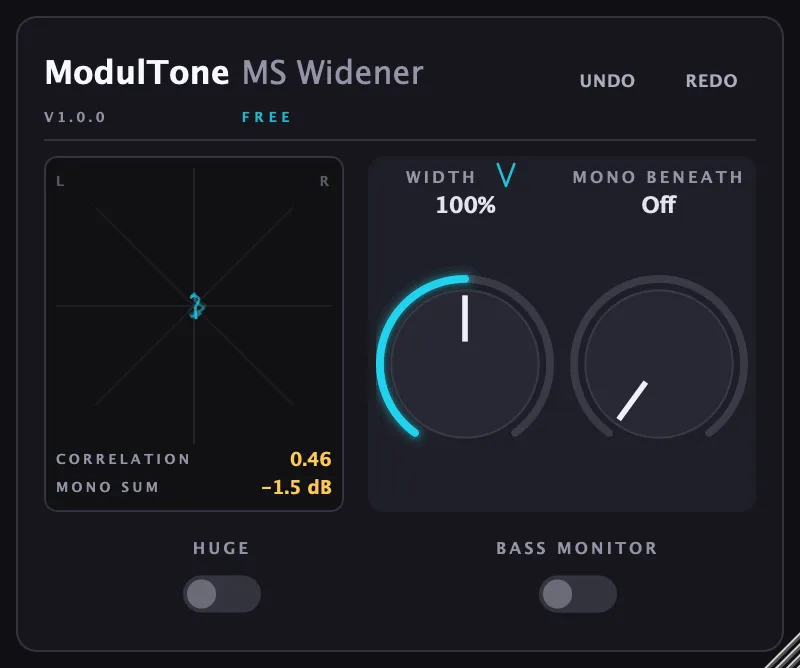
Width is applied above a bass crossover, so the low end stays centered and phase-safe while everything above it opens up. The goniometer plots the stereo field in real time as you turn the knob, which is the reason this one is free: it's the quickest way to see what mid/side does to a track before you spend money on the rest. Fair warning on Huge mode. It can introduce phase problems, and on the right track it is also the setting you were looking for.
Controls
Width
0 to 200%. Above 100% widens past the source material's natural stereo spread; below 100% narrows toward mono.
Mono Beneath
Sets a crossover frequency below which the signal collapses to mono, so bass stays centered no matter how wide the top end gets.
Huge
A more aggressive widening character for material that can take it. Further from the source, and obviously processed.
Bass Monitor
Solos the mono-collapsed low end on its own, so you can check exactly what's happening below the crossover.
What it does
- Width control from narrow to wide, 0–200%
- Mono Beneath collapses low frequencies to mono below a set crossover, so bass stays centered
- Huge mode doubles the width above 100%, up to 300% at the top of the knob, and pulls the extra back when the correlation falls below -0.3
- Built-in goniometer shows the stereo field and channel correlation in real time
- Bass Monitor auditions the mono-collapsed low end on its own
Specs
- Formats
- VST3, AU
- Requirements
- macOS 11 or later (Apple Silicon & Intel), VST3 or AU host · Windows 10 or later (64-bit), VST3 host
- Version
- 1.0.0 · 30 Aug 2026
How to use it
- What is mid/side processing?
Mid/side splits a stereo file into what both speakers share and what only one of them plays, so you can treat the centre and the edges of a mix separately.
- How to widen a mix without losing the bass
Most stereo wideners thin out the low end, because widening moves energy out of the centre where the bass lives. A crossover fixes it.
- How to make bass mono, and when not to
Summing the low end to the centre fixes most mono-fold problems in one move. It costs you something too, and the crossover point is where that trade is made.