MS Saturator 2.0
FlagshipMid/side saturation plugin for macOS and Windows
Drive the sides hard and keep the centre clean.
Price includes VAT. Licence key by email, straight after payment.
No iLok and no password. One online activation, then it runs offline. Full refund within 14 days, for any reason.
Level-matched · both takes run in sync
MS Saturator's main view: Line view
Line shows everything at once, with the mid above the line and the side below it. In the middle you pick a display: Curve, Harmonics or Live.
- Mid characterPick one of five modes for the centre of the mix.
- Side characterA mode and Drive of its own for the sides.
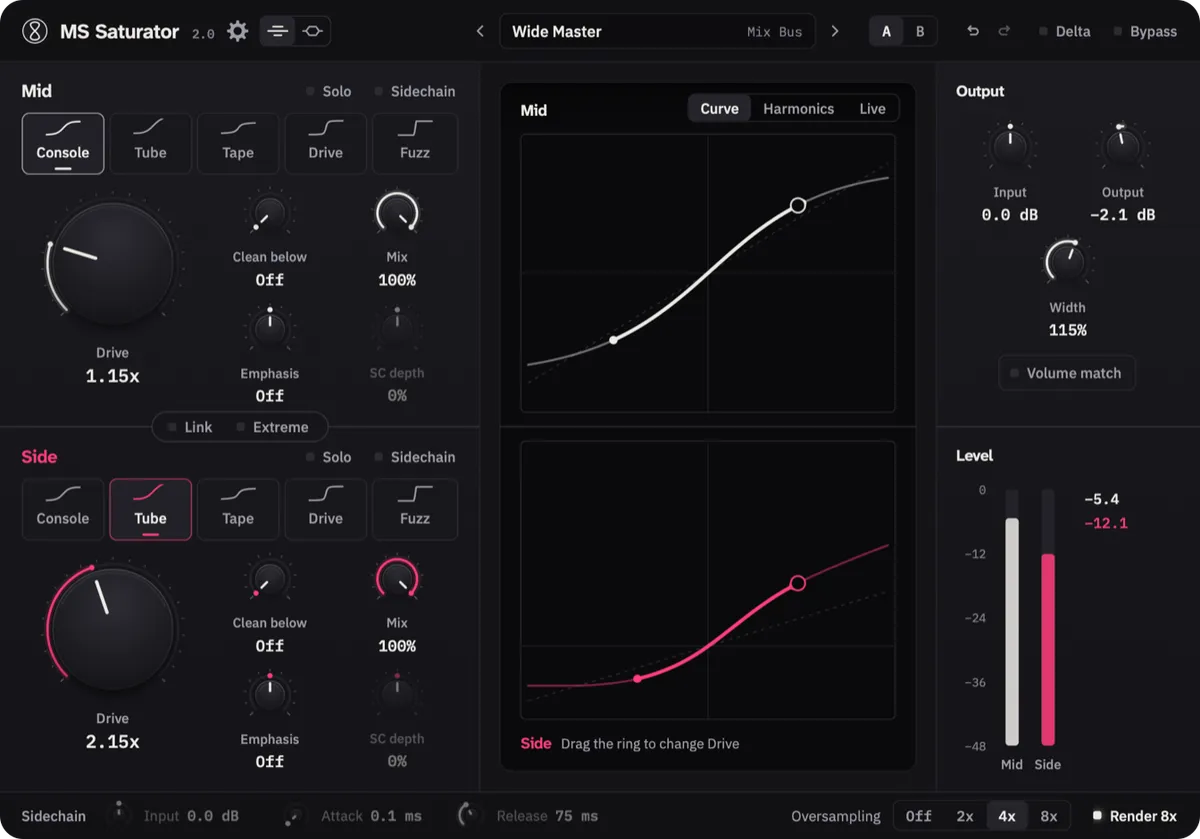
- CurveThe lit stretch is how far your audio reaches into the curve. Drag the ring to change Drive.
- Volume matchKeeps the output as loud as the input, so Bypass is a fair comparison.
MS Saturator's second view: Route view
With 2.0, every ModulTone plugin gets a second view, Route. We made it to visualise mid/side, and whether you are working on the mid or the side. Every control sits on the route that it changes.
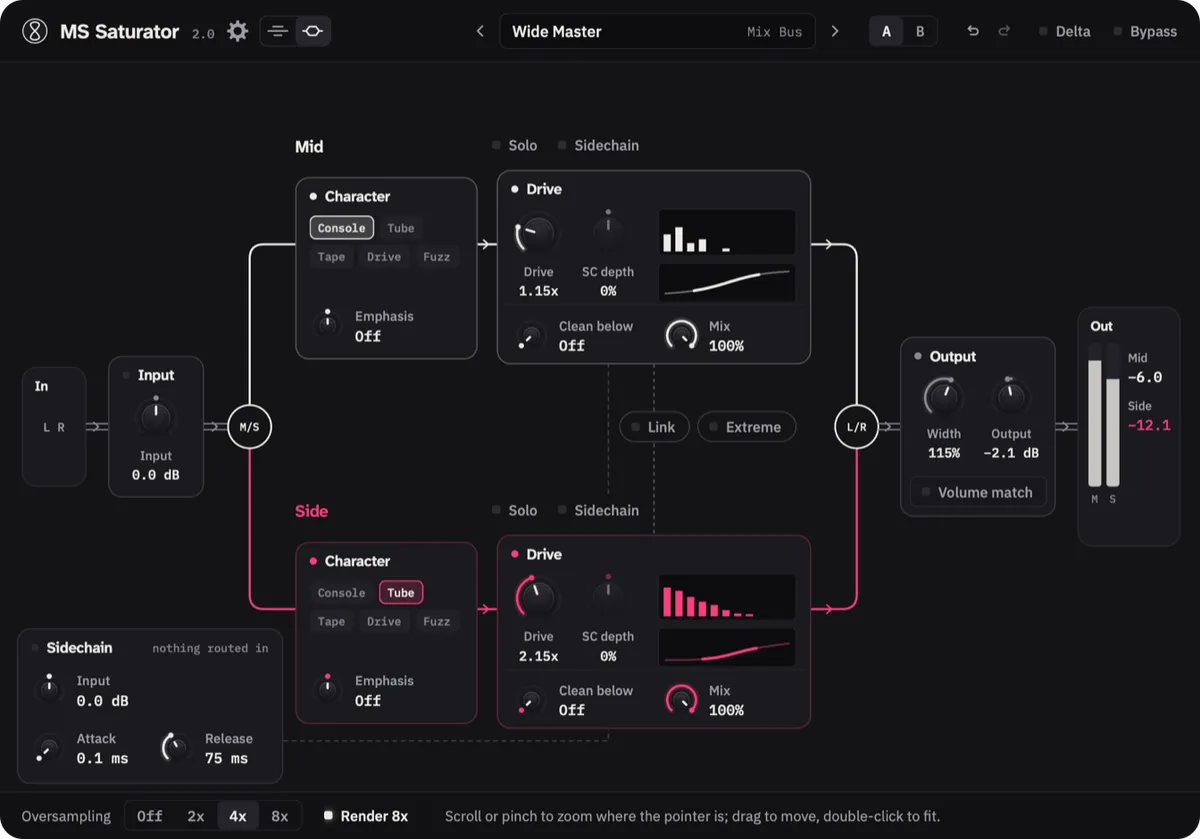
Five saturation modes, chosen separately for the mid and the side. Tape on the Mid can glue the low end while Fuzz on the Side opens up the top, clear of the vocal and kick in the centre. On a chorus, drive it well past where it sounds good, then bring it back with Mix until it sits.
Saturation modes
Console
Adds weight without changing the tone. The one for the mix bus.
Tube
Thickens the sound and takes the edge off the peaks. Good on bass and vocals.
Tape
Rounds off the peaks and softens the top end a little. Good for gluing the low end.
Drive
More bite and presence, for parts that need to come to the front of the mix.
Fuzz
Made for pushing things over the edge. Try it on the side of a drum room.
What it does
- Five saturation modes, Console, Tube, Tape, Drive and Fuzz, chosen separately for mid and side
- Two views: Line shows everything at once, Route draws the signal path from input to output
- Three displays: Curve shows the saturation curve, Harmonics shows which harmonics each mode adds, and Live shows per octave what the saturation adds to your track
- Clean below on each channel keeps everything under a frequency out of the saturation, so kick and bass hold their shape
All 17 features
- Mix on each channel: drive hard and bring it back without losing volume
- Emphasis puts the saturation in the highs or in the lows
- A sidechain input per channel: send a kick in and let it move the side's drive while the mid ignores it
- SC depth runs from −100% to +100%, so the sidechain can pull the saturation back or push it harder on every hit
- A ring around each Drive knob shows where the sidechain has it right now
- Extreme takes every mode far past sounding good, which might be exactly what you are after
- Link ties the mid and side Drive together
- Volume match keeps the output as loud as the input, so Bypass is a fair comparison
- Delta plays only what the saturation adds
- Width after the saturation, from mono to 200%
- Solo the mid or the side to hear it on its own
- Oversampling up to 8x, and Render 8x runs offline bounces at 8x
- 37 presets, A/B compare and full undo
Specs
- Formats
- VST3, AU
- Requirements
- macOS 11 or later (Apple Silicon & Intel), VST3 or AU host · Windows 10 or later (64-bit), VST3 host
Or try it free for 7 days
MS Saturator is one of 6 in The Mid/Side Core
All 6 for €249, which is €105 less than buying them one at a time.
How to use it
Changelog
2.0.09 Nov 2026
- New interface, with a second view, Route, that draws the signal path
- Added three displays: Curve, Harmonics and Live
- Added Clean below, Emphasis and Mix, set separately for mid and side
- Added Delta, which plays only what the curves add
- Added Volume match, which replaces Auto gain
- Added a sidechain Input, and the sidechain switches on when a signal arrives
- Added 8x oversampling and Render 8x
- Added 14 presets, 37 in all
- Added crossfades when you switch a character, Extreme or Solo
- Changed: Console and Tube no longer fold back at high drive, and Tube has a soft ceiling
- Changed: Output runs from −24 to +24 dB
- Removed: Auto gain and the overall Mix knob
- Projects saved with 1.x open in 2.0, but they can sound different
1.1.09 Oct 2026
- Added a 7-day trial
- Added a Buy button to the licence window
- Added update notifications with a one-click Update button
- Added a gear menu to turn update notifications off
- Added a daily check for withdrawn licences (offline keeps working)
- Changed: Mac activation no longer sends your DAW, macOS version or language
- Fixed: the Mac installer always installs to the plug-in folders
1.0.030 Aug 2026
- First release.