MS Clipper
Mid/side clipper plugin for macOS and Windows
Clip the centre and the sides on separate curves.
Launch price until 30 September. Price includes VAT. Licence key by email, straight after payment.
Level-matched · both takes run in sync
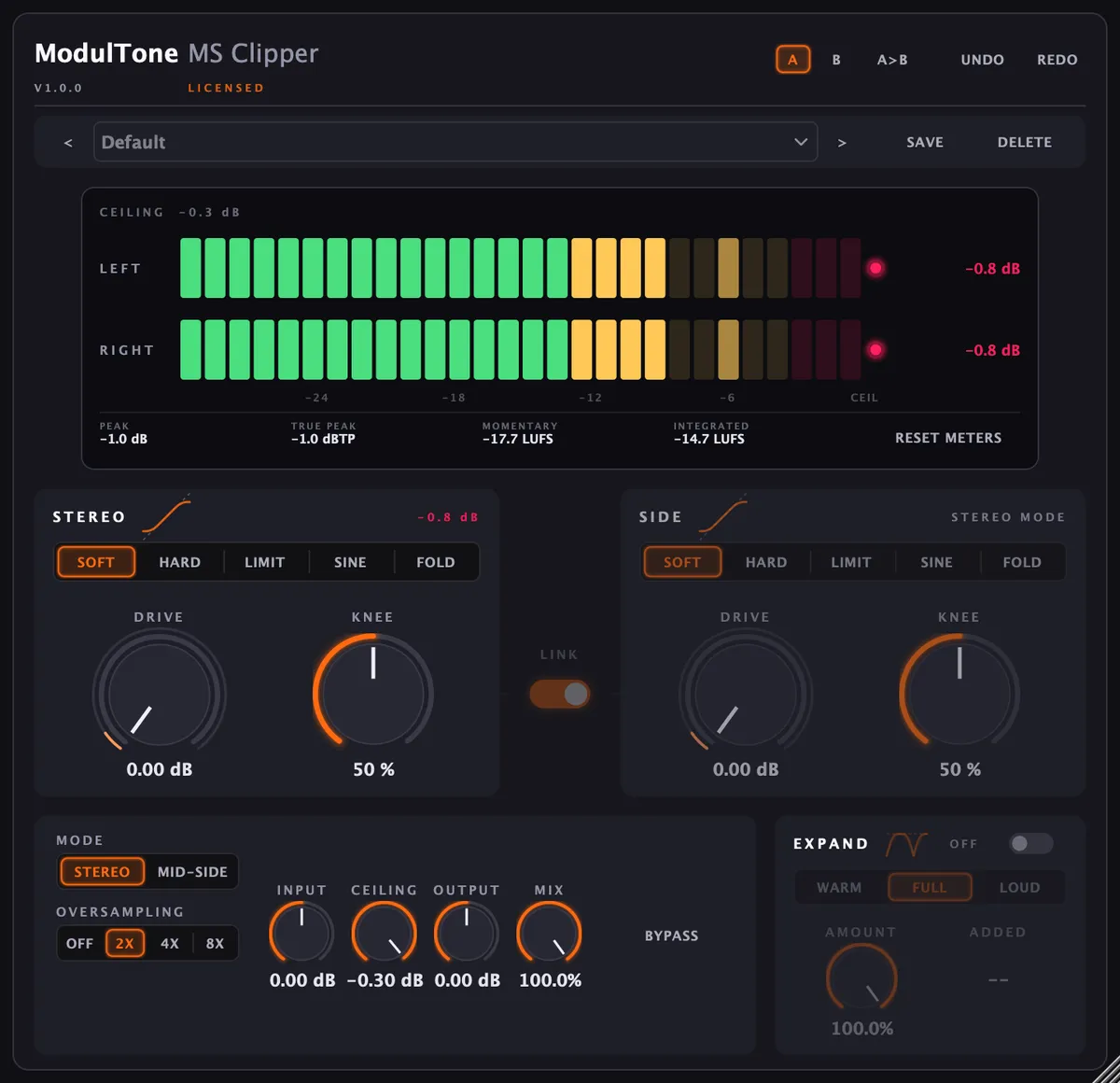
Hold the middle with Limit so the vocal and the kick keep their shape, and run the sides through Fold, where the waveform turns back on itself and the cymbals get their edge. Both lanes have their own shape, drive and knee. Clipping the mid and the side separately is a different operation from clipping left and right separately, even with identical settings on both. A nonlinearity does not commute with the mid/side matrix, which is why the Stereo/Mid-Side switch is a mode of its own.
Clip shapes
Soft
A quadratic knee that meets the line at slope 1 and arrives flat. The most forgiving of the five, and it adds a little harmonic colour as it catches transients.
Hard
A corner. Anything past the ceiling gets cut, and the brightest of the five as a result. Best at raising perceived loudness.
Limit
Reaches the ceiling by pulling gain down instead of bending the waveform. The everyday setting, and the one that leaves character alone. Knee sets its release.
Sine
A sinusoidal knee: the longest, smoothest approach to the ceiling of the four that clip.
Fold
The same sine curve left unclamped, so the waveform folds back on itself past the quarter turn. Loud, obvious, and the reason the side lane has its own shape selector.
What it does
- Five clip shapes per lane: Soft, Hard, Limit, Sine, Fold
- Stereo mode drives both channels from one control set; Mid-Side gives the side lane its own shape, drive and knee
- The five shapes are level-matched by construction: every one passes signal untouched below the knee and arrives there at unity slope, so switching shape changes the peaks and not how loud the track is
- Knee sets how much of the signal the curve colours, and turns into a release control in Limit mode rather than sitting there dead
- Drive 0 to 24 dB per lane, starting at 0. A clipper that arrives already clipping can't be A/B'd against not having it
- Ceiling defaults to -0.3 dB, leaving a sliver for the inter-sample peaks a converter reconstructs between the samples you clipped
- Oversampling at 2x by default, up to 8x, so the harmonics a corner generates don't fold back into the audible band
- Expand gives level back below the ceiling, for material that lost its contrast on the way in
- Link ties the two lanes together with one set of controls
- Mix blends the clipped signal against the dry one
Specs
- Formats
- VST3, AU
- Requirements
- macOS 11 or later (Apple Silicon & Intel), VST3 or AU host · Windows 10 or later (64-bit), VST3 host
- Version
- 1.0.0 · 30 Aug 2026
MS Clipper is one of 6 in The Mid/Side Core
All 6 for €149, which is €89 less than buying them one at a time.
How to use it
- Mid/side clipping explained
Clipping the mid and the side separately is a different operation from clipping left and right, even with identical settings. Here's why, and what to set.