Free stereo widener, VST3 and AU
A stereo widener makes a mix sound bigger on headphones. The question is what's left when the same mix plays on a phone, a laptop, a club system or a mono speaker. MS Widener widens with mid/side and keeps the low end in mono below a crossover you set. A goniometer shows the result while you turn the knob. It's free and complete, for macOS and Windows.
The full plugin, free for good. No card and no time limit.
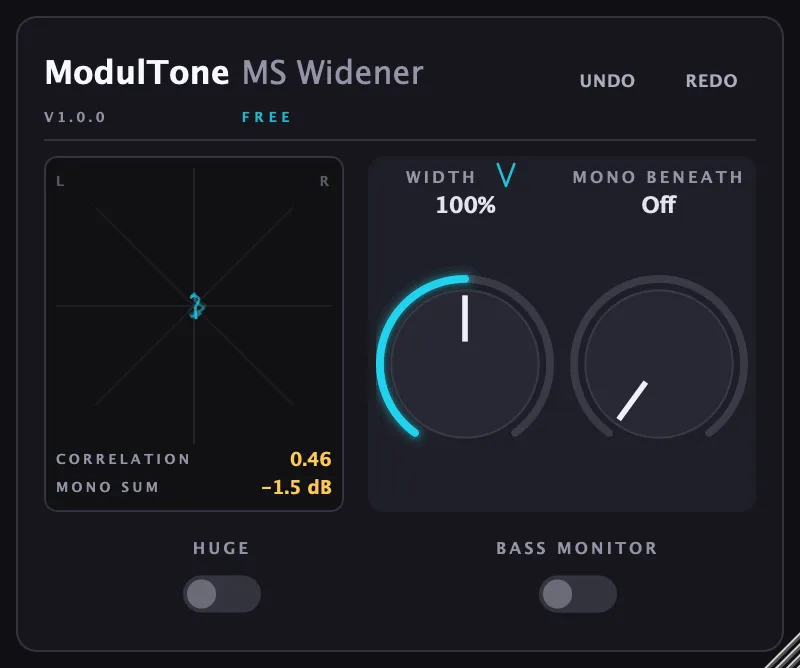
What MS Widener does
It splits the stereo signal into mid, what both speakers share, and side, what they don't. Width turns the side up or down: 100% is the original, 200% doubles the side, and below 100% narrows toward mono. The knob is loudness-compensated, so a wider setting can't win the comparison just by being louder.
Why keep the low end centred?
Bass carries most of a mix's energy, and it's where left and right disagreeing costs the most. Club systems usually run the subs in mono, and a phone speaker is mono anyway. Mono Beneath takes the side out below a frequency you choose, up to 500 Hz, so the kick and the bass stay in the middle however wide the rest gets. Bass Monitor plays only that region, so you can check it.
Watch it on the goniometer
The built-in goniometer draws the stereo field while the track plays. A vertical line is mono and a wider cloud is wider stereo. When the shape leans toward the horizontal, left and right are working against each other. The correlation reading under it says the same thing as a number.
When to reach for Huge
Huge mode doubles everything above 100%, up to 300% at the top of the knob. It can cause phase problems, and on the right track it's also the setting you were looking for. It pulls its extra width back on its own when the correlation drops below −0.3.
Four places to use it
Vocals
Widen the doubles and the reverb return, never the lead. The lead is the one thing that should stay in the middle.
Synths
A mono synth patch sounds small next to a stereo drum bus. 120 to 140% on the synth bus gives it room without moving its low notes.
Bass and 808
Leave Width at 100% and use Mono Beneath on its own to fold a stereo bass to mono below 120 Hz or so.
Mastering
Small moves. A few percent of width with Mono Beneath around 100 to 150 Hz, then check the goniometer and a mono fold before you commit.
Runs on macOS and Windows
VST3 and AU on macOS 11 or later, Apple Silicon and Intel. VST3 on Windows 10 or later, 64-bit. There's no AAX version, so it doesn't run in Pro Tools.
Stereo widener questions
- Is a stereo widener bad for mono compatibility?
- It can be, when it widens the low end or delays one channel against the other. Widening with mid/side and keeping the bass in mono avoids both. Check the result by folding it to mono, or drop a bounce into the free mono tester on this site.
- How wide is too wide?
- When the correlation reading spends most of its time below zero, or the mix loses its centre in mono. On most material 110 to 150% is plenty.
- What's the difference between width and panning?
- Panning moves a sound between the speakers. Width changes how different the two speakers are, so a sound in the middle stays there while its reverb and stereo detail spread out.
- Is MS Widener really free?
- Yes, for good. It's the full version, with no card and no time limit. The download link comes by email.
Get MS Widener
The full plugin, free for good. No card and no time limit.
Liked MS Widener? Mid/side does more than width.
Each of these works on the mid and the side separately, the way MS Widener does, for a different job in the mix.
- MS SaturatorDrive the side harder than the centre, or the other way round.
was €69€45 - MS CompressorCompress the centre and the sides with their own settings.
was €49€35 - MS PunchShape the attack in the middle and leave the room on the sides alone.
was €59€39 - MS FieldSee, per band, what the mix loses in mono before anyone else hears it.
was €49€35